


Local Weather: Live Forecast
4.63.62K Reviews
App Specs
- Version
- 1.9.18
- Updated On
- License
- Free
- Downloads
- 10,000,000+
- Developer
- WINDWAVE LIMITED
- Categories
- Weather
- Platform
- Android
Screenshots
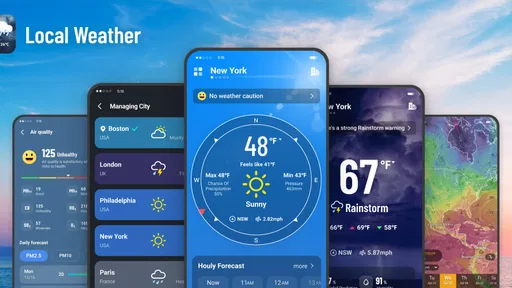
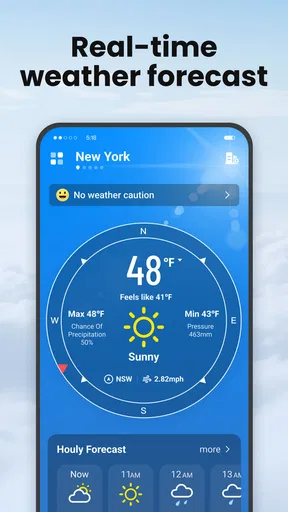
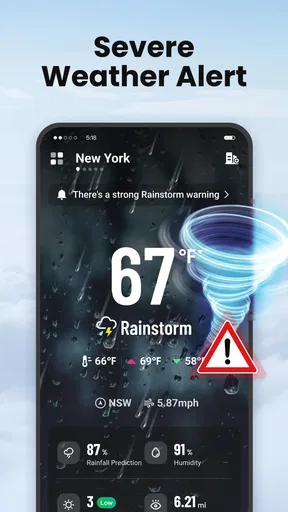
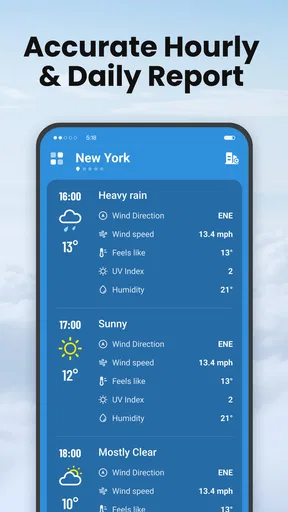
 Analysis by AppCompare
I use a weather app most when I need to make a small decision quickly: whether to take a coat, shift a walk, or leave a little earlier. That everyday role is where Local Weather: Live Forecast makes sense. It is a free weather app from WINDWAVE LIMITED, and its appeal is the mix of local conditions, forecasts, alerts, and map views rather than a complicated collection of tools. I would treat it as a practical companion for planning, not as a promise that the weather will always behave exactly as predicted.
Who will get the most from it
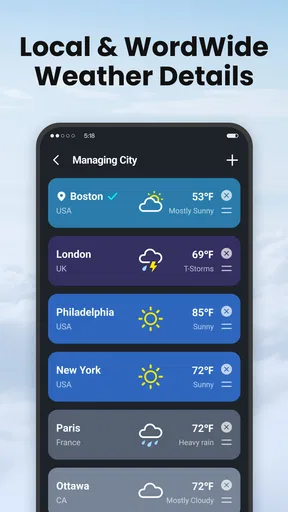
This app is best suited to people who check the weather in short bursts throughout the day. If you commute, walk a dog, plan outdoor errands, or regularly coordinate with family in another place, having current conditions and forecast views together can save a few separate searches. The option to keep multiple locations is especially useful when “local” means more than the place where you happen to be standing: I can check home before returning from a trip, or see what conditions look like where relatives live.
It is also a reasonable fit for someone who wants more context than a single temperature number. Humidity, wind, air quality, and the radar view can help explain why a day feels different from what the temperature alone suggests. I would still check a specialist source before making a high-stakes weather decision, but for ordinary plans this broader snapshot is more useful than a bare daily icon.
A forecast is a planning aid, not a guarantee
Weather forecasts are inherently uncertain, and I would not judge any app by whether every prediction lands perfectly. Local conditions can change quickly, and a forecast that is helpful for deciding what to wear may not be precise enough to settle a long outdoor plan. I use the hourly view to think about timing and the weekly view to spot broad patterns, then revisit the details closer to the moment if the decision matters.
That distinction is worth keeping in mind with notifications, too. Alerts can help bring an important change to your attention, but they should supplement rather than replace your own check before heading into severe weather. If you rely on an alert, make sure notifications are enabled in the way you prefer and that your phone is not silencing them. For travel, outdoor work, or any situation where conditions could affect safety, I would compare the app’s information with an appropriate official weather source.
Making the map and locations work harder
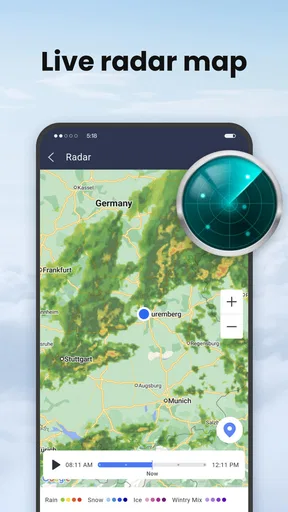
The radar map is more useful when I approach it with a specific question. Instead of just zooming around, I might check whether precipitation appears to be moving toward a destination, or compare the area around home with the place I plan to visit. That gives the map a practical role alongside the forecast cards: one offers a view of current patterns, while the other helps me plan around expected conditions.
Multiple saved locations can also become cluttered if you add places casually and never revisit them. I would keep the list focused on locations that regularly affect a decision—home, work, a frequent destination, or a family member’s area—rather than turning it into a directory of every place I might visit one day. A shorter list makes quick checks quicker and helps keep the app’s main purpose clear.
Worth Reading Before You Choose

Flipboard Shows What News Apps Must Do Beyond the Feed

Switching to Android Auto Means Rethinking Your Driving Routine

Google Calendar Makes a Crowded Week Easier to Manage

Ludo King Makes the Most of the Minutes Between Plans

Baby Panda World Brings Quick Play to Modern Phones, but Its Game Library Feels Busy

ESPN’s Live Game View Makes Following Close Games Easier
Where another weather option may suit you better
Compared with a phone’s built-in weather panel, this app offers more to explore, including the radar and multiple saved locations. The trade-off is that a dedicated app can ask for more attention: if all you ever need is a quick temperature glance, the built-in option may be simpler. People who want highly specialized meteorological charts or a workflow built around severe-weather tracking may also prefer a service focused on those needs, rather than relying on a general local forecast app.
I would also be selective about alerts. They are valuable when they tell you something you would act on, but frequent notifications can become background noise. Start with the warnings or summaries that matter most to your routine, then adjust if they interrupt more than they help. This is a small habit, but it makes a weather app feel like a useful assistant instead of another source of pings.
Getting Started with Local Weather: Live Forecast
First things first, downloading and setting up Local Weather: Live Forecast is a breeze. Available on both Android and iOS, it’s just a quick trip to your app store, and boom, you’re good to go. The interface is straightforward, which I totally appreciate because, let’s be honest, who has time to figure out a complex app when you just want to know if you need an umbrella?
User Experience
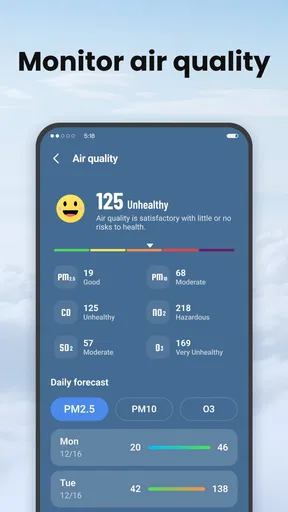
The moment you open the app, you’re greeted with a clean and intuitive dashboard. I love how easy it is to navigate. The main screen presents the current weather conditions in your location, complete with temperature, humidity, wind speed, and even air quality indicators. This is super handy for those of us who like to keep an eye on the pollution levels.
One of my favorite features has to be the hourly and weekly forecasts. You can swipe through the week at a glance or delve into each day for more detailed weather predictions. It’s kind of like having a crystal ball, but for the weather!
Features That Stand Out
What sets this app apart from others is its real-time weather alerts. The app will nudge you with notifications about sudden weather changes, ensuring you’re never caught off guard. This is especially useful during unpredictable seasons when the weather seems to have a mind of its own.
Another standout feature is the radar map. It’s visually appealing and incredibly detailed, showing precipitation patterns, storms, and even cloud cover. You can pinch, zoom, and scroll through the map to explore different areas, which is perfect for those who travel frequently or have loved ones in different parts of the country.
Customization and Personalization
Let’s talk customization. Local Weather: Live Forecast lets you tailor alerts and notifications to your needs. Whether you’re interested in severe weather warnings or just a daily weather summary, you can set it up to only get the info that matters to you.
The app also allows you to add multiple locations, so if you’re someone who loves following weather patterns in your favorite travel destinations, or keeping tabs on the weather where your family lives, this feature will be your best friend.
Performance and Reliability
Now, onto performance. I’ve found the app to be pretty spot-on with its forecasts. The data seems to refresh frequently, keeping everything up to date. I haven’t experienced any crashes or bugs, which is a huge plus in my book. Plus, it’s not a battery hog, so you can keep it running in the background without worrying about draining your phone.
Final Thoughts
In a world where the weather can be as unpredictable as a plot twist in your favorite drama, having Local Weather: Live Forecast at your fingertips is a relief. It’s accurate, user-friendly, and packed with features that make planning your day a whole lot easier.
Whether you’re a weather enthusiast or just someone who wants to stay dry and warm, this app is definitely worth checking out. So go ahead, give it a try, and let the weather be one less thing you have to worry about.
What the current release means for new and returning users
The app was released on April 7, 2024, and its current version is 1.9.0. Those details give a useful point of reference: someone installing it now is getting a product that has had time to move beyond its initial release, while an existing user can check the version shown on their device before assuming the interface or behavior is identical. I would not infer a particular feature change from a version number alone. The sensible approach is to judge the present app by what it actually offers on your phone, and to keep it current if you want the latest available build.
For someone returning after a break, the most practical check is whether saved locations and notification preferences still match current routines. A weather app can quietly become less useful when an old trip destination stays pinned or alerts are set for a schedule that has changed. I would take a moment to review those choices rather than turning on every notification again. That keeps the app relevant without assuming that a newer release must have changed a particular tool.
A realistic day with the app
Imagine I have an early commute, a lunch break I hope to spend outside, and an evening walk planned. In the morning, I would look at the current conditions and hourly forecast together: temperature alone does not tell me whether wind or humidity will make the trip uncomfortable. Before lunch, I can revisit the hours around the break instead of relying on the morning glance. If the radar shows precipitation near the route, I have a reason to carry an umbrella or move the walk, while the saved home location helps me think ahead to the return.
The useful habit here is not checking constantly; it is checking at decision points. A quick morning look can guide clothing, a later check can help with timing, and a map glance can add context when rain is the concern. That workflow makes the app more useful than leaving it open in the background and hoping alerts will manage the day for me. It also avoids treating a weekly outlook as a precise schedule: I use it to notice a possible change in the general pattern, then make the real call nearer the time.
Choosing between a quick glance and deeper detail
Not every screen is needed for every question. If I only want to know whether it is cold outside, the main conditions are enough. If I am deciding whether to cycle or spend time outdoors, wind, humidity, and the hourly forecast deserve a look as well. For questions about where rain may be relative to a route, the radar is the more relevant tool. Matching the view to the decision prevents information overload and makes the app easier to use quickly.
Air quality is another detail I would use as context rather than a standalone verdict. It can help me reconsider a run or an outdoor activity when pollution is a concern, but anyone with health sensitivities should follow the guidance they normally rely on rather than treating one app display as medical advice. Similarly, a radar image helps me reason about visible weather patterns; it does not remove uncertainty about exactly when or where conditions will change.
Cost, age suitability, and the decision to install
The app is free to download, with in-app purchases ranging from $0.99 to $39.99 per item. I would try the free experience first and only consider a purchase if its specific value is clear to me. Those purchase options make it worth paying attention before confirming anything, especially if the basic forecast already covers your needs. The app is rated for Everyone, which makes it broadly suitable from a content perspective, though younger users may still need an adult to help manage phone settings and purchases.
Its average rating is 4.6 from around 59,000 ratings, with about 3,500 written reviews, and it has been installed over 10 million times. I see that reach as a sign that it has found an audience, not proof that every local forecast will match every person’s experience. Weather usefulness varies by location and by what you expect from an app. If you mainly need a simple glance, try it alongside your phone’s built-in forecast before deciding which feels less distracting; if maps and several locations matter to you, this dedicated option has a clearer case.
What I would keep an eye on
For prospective users, I would watch how well the app fits your own routine over a few ordinary days: whether the local conditions are easy to find, whether the hourly view helps with timing, and whether alerts are useful rather than intrusive. For current users, I would pay attention to whether the forecast refreshes when you need it and whether the location list stays manageable. These are practical tests, not assumptions about future changes.
At minimum, the app runs on Android 7.0 or later, so anyone with an older device should check compatibility before planning around it. Beyond that, my recommendation depends on your expectations. Local Weather: Live Forecast is a sensible choice if you want local conditions, multiple places, forecast views, and a map in one weather app. I would skip it if you prefer the fastest possible glance, need specialized forecasting tools, or do not want to manage another app’s alerts and optional purchases. For everyday planning, it gives me useful ways to make a better-informed call while leaving room for the weather—and my own judgment—to have the final word.
Pros
- Accurate real-time weather updates.
- User-friendly and intuitive interface.
- Detailed hourly and weekly forecasts.
- Customizable weather alerts.
- Supports multiple locations tracking.
Cons
- Occasional ads can be intrusive.
- Some features require in-app purchases.
- Limited customization for widgets.
- Background data usage may be high.
- Interface can be slow on older devices.
FAQs for Local Weather: Live Forecast
How accurate is the weather forecasting in Local Weather: Live Forecast?
Local Weather: Live Forecast is highly regarded for its accuracy. It uses data from multiple reliable sources and advanced algorithms to provide precise weather updates. Users can expect real-time information on temperature, precipitation, wind speed, and more, offering a dependable tool for daily planning.
Does Local Weather: Live Forecast offer severe weather alerts?
Yes, Local Weather: Live Forecast includes severe weather alerts to keep users informed about potential weather threats. These alerts are timely and help users prepare for emergencies, ensuring safety during situations like storms, heavy rainfall, or extreme temperature changes.
Can I customize the app to show weather updates for multiple locations?
Absolutely! Local Weather: Live Forecast allows users to add multiple locations to track weather conditions in different areas. This feature is particularly useful for frequent travelers or those wanting to monitor weather conditions in locations where friends or family reside.
Is Local Weather: Live Forecast available offline?
The app primarily requires an internet connection to provide real-time updates. However, it does offer limited offline functionality, allowing users to view previously downloaded weather data. This ensures access to some information when connectivity is an issue, though updates won’t be available.
What additional features does Local Weather: Live Forecast offer?
Local Weather: Live Forecast provides a range of features beyond basic forecasting, such as radar maps, air quality indices, sunrise and sunset times, and detailed hourly forecasts. These features enhance user experience by offering comprehensive weather information all in one place.


